



- Accessibility
YouTube SEO Strategy: Tips to Boost Your Search Ranking
•

YouTube SEO is the practice of optimizing your video titles, descriptions, tags, captions, and transcripts so your content ranks higher in YouTube and Google search results.
YouTube is the second-largest search engine in the world, second only to its parent company, Google. Creators upload over 20 million videos to the platform daily, on average, and YouTube now reaches over 2.7 billion monthly active users worldwide who together watch more than 1 billion hours of video every day.
So how do you avoid getting lost in that sea of videos? Your best bet is to optimize great videos for search using video SEO best practices. With these tips, you can build a solid YouTube SEO strategy, and increasingly, a strategy that reaches audiences well beyond English speakers.
Boost Views and Watch Time with AI Dubbing
3Play’s AI dubbing finds your best-fit languages by analyzing views, watch time, and revenue by geography, then delivers human-reviewed, AI-accelerated dubs that can drive up to 300% more daily views per language.
What is a YouTube SEO strategy?
Search Engine Optimization (SEO) is the ever-changing practice of designing web content to rank highly in search engine results pages (SERPs). Search is often the gatekeeper to your content, so optimizing for search is necessary to attract traffic and grow a following.
Unlike Google, which uses backlinks and other factors to evaluate rank, YouTube SEO involves optimizing your channel, playlists, metadata, descriptions, and videos. You can optimize your videos for search both within and outside of YouTube.
You may know the basics of SEO for YouTube videos, like including keywords in titles, meta descriptions, and tags. However, there’s more you can do for YouTube SEO through video accessibility and localization.
Since search engine bots cannot watch videos, they rely on accompanying text data to index them properly. A key component of a YouTube SEO strategy is harnessing the power of your video’s text (and increasingly, its audio in other languages) in the form of transcripts, closed captions, subtitles, and dubs. Together, these can positively impact user experience, engagement, watch time, viewership, and SEO.
Here are ten tips for maximizing views and boosting your YouTube SEO.
YouTube SEO Tips:
1. Select a great keyword
Before you can boost YouTube SEO, you need to select the right keyword or phrase for your video. Keywords often land in video titles and metadata, and when spoken in the audio, keywords appear in captions and transcripts. That’s a win-win for SEO.
Keywords and keyword phrases should correspond with a) whatever describes your video accurately and b) the words and phrases that users enter in search engines to find content like yours.
To find out what phrases and keywords people use in search, you’ll have to do some keyword research.
An easy strategy is to use YouTube’s Search Suggest: type a word or phrase relevant to your industry into the search bar and see the suggestions YouTube offers.
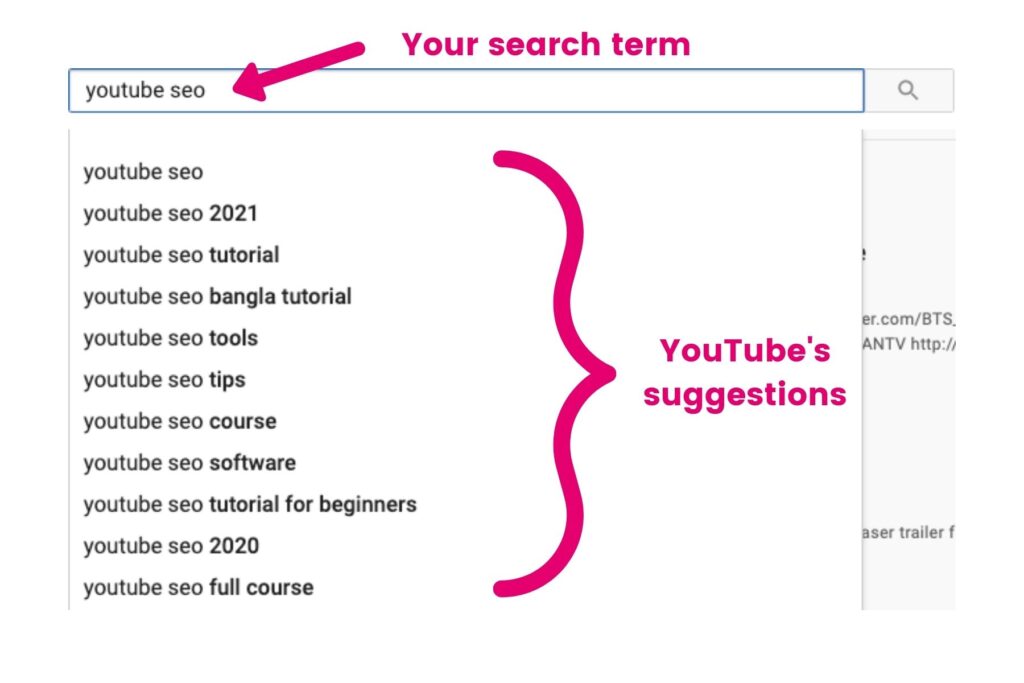
You can also pull keywords from your YouTube Studio search report (Analytics > Research or Traffic Sources > YouTube search).
To check if you have a good keyword, search for it on YouTube and see how many results it generates. Ideally, you want keyword variations with high search volume but less competition so you can stand out from the crowd.
Plenty of tools can help with keyword research, including:
With these tools, you can explore keyword volume (the number of monthly searches a term gets) and related metrics like competition and trend direction.
After you’ve identified a great keyword, include it in your video file’s name so YouTube knows your video’s topic. For example, your file name could be “makeup-tutorial-for-the-hulk” followed by your video file type.
Pro tip: For individual videos, try going after “long tail” keyword phrases, which are more specific. For example, “makeup tutorial for the Hulk” is a more targeted keyword phrase than just “makeup tutorial.”
2. Include accurate closed captions
YouTube automatically generates captions for most uploads using speech recognition. That technology has improved substantially since it launched, but accuracy still swings widely depending on conditions: clean, single-speaker audio can land in the high 80s to mid-90s percent range, while background noise, overlapping speakers, accents, or technical jargon can drag accuracy down into the 60-75% range.
Professional human transcription, by contrast, is held to a 99%+ accuracy standard, the threshold accessibility experts consider the minimum for captions to be reliable — though it comes at a much higher cost.
Google rewards helpful search results and penalizes spam. Inaccurate, auto-generated captions can read as low-quality content, and low-quality captions can hurt both viewer experience and search rank.
To combat the inconsistency of auto-captions, add accurate closed captions through an SRT file to your YouTube videos. Search engines can crawl text, but they can’t watch videos. Your captions will be full of relevant keywords that indicate what your video is about so Google can crawl and rank your content accordingly.
There are multiple ways to add captions to YouTube videos. Some creators use the auto-generated transcript as a starting point and manually clean up errors. Others use DIY transcription tools, which are cheap but time-consuming and tedious.
The simplest solution is to send your videos to a professional video captioning service, which offers high accuracy with a quick turnaround.
The best of these services use a human-in-the-loop approach: AI speech recognition generates a first-pass transcript quickly, and trained human editors then review and correct it against the audio for accuracy, speaker labels, punctuation, and context that pure automation still gets wrong.
This combination delivers the speed of AI with the accuracy of human review, without asking you to choose between the two.
Additional captioning benefits
In addition to increasing SEO, captions also have these benefits:
- Higher search rank: A study by Discovery Digital Networks found that captioning YouTube videos boosted views: 13.48% in the first two weeks and 7.32% overall. Researchers tested this by searching for a keyword phrase present only in the video’s captions (not the title, description, tags, or metadata), and captioned videos still ranked for it because search engines could crawl the caption text.
- Better user experience and engagement: Closed captions keep viewers engaged regardless of their access to audio, which is especially important since mobile devices account for 69% of total YouTube watch time. Captioned videos tend to earn more likes, shares, and comments than videos without them, and higher engagement and watch time are both meaningful ranking factors on YouTube.
- Video accessibility: Closed captions make your videos accessible to viewers who are deaf or hard of hearing, and let hearing viewers watch on a noisy train or in a quiet library with the sound off. Captions make your video viewable, understandable, and enjoyable for a larger audience.
3. Add a transcript to your video description
The video description is the best place to display your transcript on YouTube. The description field fits 5,000 characters, which is usually enough for a dialogue-heavy, 10-minute video. If your transcript doesn’t fit, or you want to include other important information like a call-to-action, add a truncated version with a link to the full transcript on a separate web page.
Keyword-rich descriptions remain a recommended best practice, since they can help your video rank for related terms and appear as a “suggested video.” Transcripts also boost engagement by making content quickly scannable.
Pro tip: Make video transcripts your content marketing shortcut
Many brands do great outreach with video but fail to realize transcripts can do so much more. Videos can be a starting point for content creation and targeted inbound marketing through transcripts and derivative content, such as:
- Blogs
- Infographics
- Whitepapers
- Fact sheets
- Website copy
4. Offer subtitles and dubs in multiple languages
Just as English captions make your videos accessible to more viewers, translations further expand your audience and increase YouTube SEO. YouTube’s global reach is massive: the platform now has more than 2.7 billion monthly active users, and the large majority of that audience lives outside the U.S.
Foreign language subtitles let international and non-native English-speaking viewers enjoy your videos, and search engines will index your translated caption files and surface your video in search results in those languages. That’s a real opportunity for a YouTube SEO strategy, since you often face less competition ranking for non-English keywords.
But subtitles are only half the opportunity.
Benefits of YouTube Dubbing
YouTube itself has reported that creators using multi-language audio dubbing see more than 25% of a dubbed video’s watch time coming from viewers watching in a language other than the original recording, a figure that has climbed as the feature has expanded.
That means dubbing doesn’t just add accessibility, it adds an entirely new, engaged audience segment that subtitles alone don’t fully capture. Viewers are far more likely to stay for a full-length video when they can listen in their own language rather than read along.
The catch: quality matters enormously here. YouTube’s native auto-dubbing feature and other pure-AI dubbing tools can sound robotic, which risks damaging viewer trust and brand perception rather than building it.
Using 3rd Party Dubbing Services
That’s why more creators and channel teams are turning to managed AI-plus-human dubbing workflows that combine the speed of AI with human review of scripts, translation, and voice performance.
3Play Media’s AI dubbing for YouTube creators connects directly to your channel data (analyzing views, watch time, and revenue by geography) to help you decide which videos and languages are worth localizing first, then delivers human-reviewed, AI-accelerated dubs synced to your publishing schedule.
Creators using this approach have seen a 15%+ increase in average view duration compared to YouTube’s native autodubs, and up to a 300% increase in daily views per dubbed language.
Whatever route you take, always check translations and dubs for accuracy, and consider using a vendor for guaranteed quality on both subtitles and dubbed audio.
See how 3Play’s YouTube dubbing works →
5. Write a keyword-optimized title, description, and tags
Once you have a great keyword, make sure the text associated with your video is keyword-optimized.
For example, if you publish makeup tutorials, optimize the title, description, and tags for the phrase “makeup tutorial.”
Search engines have wizened up to keyword-stuffing, the practice of overusing keywords to try to hack the system. Don’t bother. Write for humans, not robots, or you may get penalized.
Once you’ve done your keyword research, incorporate keywords naturally into these fields:
- Title: Fits 100 characters but truncates around 70, so your most important information and keyword should be near the front. Compelling language (“how-to,” “tips,” numbered lists) helps encourage clicks, for example, “7 Tips to Increase Video Subscription Rates.”
- Description: Fits 5,000 characters but typically truncates around 120-150 characters depending on device. Include any links (with the full https:// so they’re clickable) near the top, since more than half of consumers say product videos influence purchase decisions.
- Tags: Fits roughly 500 characters, but don’t go overboard. Use quotation marks to group phrases so your video is an exact match for a long-tail keyword (“makeup tutorial” instead of separate “makeup” and “tutorial” tags). Add tags in order of importance.
YouTube’s own Creator Academy recommends:
- Giving an overview of your video in natural language, not a stream of keywords.
- Putting the most important keywords toward the beginning of your description.
- Identifying 1-2 main words that describe your video and featuring them prominently in both title and description.
- Using tools like Google Trends and Google Ads Keyword Planner to identify popular keywords and their synonyms.
- Avoiding irrelevant keywords that create a poor viewing experience or violate YouTube policy.
If you post the same video on other domains, vary the keyword phrasing slightly so you’re not competing against yourself across sites. And always use honest, relevant terms rather than riding irrelevant trending topics.
6. Use a compelling thumbnail
Choosing the right thumbnail makes a drastic difference in click-through rate. Use high-quality, high-contrast images with a 16:9 aspect ratio. Facial close-ups tend to perform well. YouTube offers three auto-generated screenshot options, but you can also select a custom frame or upload your own image.
If you need ideas for images, try using sites such as Canva, which has thumbnail templates just for YouTube videos.
Note that YouTube overlays the video duration in the lower corner of the thumbnail, so make sure it doesn’t obstruct anything important. Google also uses image recognition to automatically filter out certain imagery, such as third-party logos.
Ideally, your thumbnail should visually represent your target keyword, which helps reinforce relevance in search and recommendations.

7. Focus on user engagement
Engagement metrics (comments, likes, shares, and subscriptions) correlate strongly with higher rankings. Google cares about how viewers respond to your content because that’s what keeps people on their platform. Encourage viewers to share, like, or comment, and take the time to respond to comments and messages.
YouTube watch time
Watch time, the actual time spent watching, not the percent completed, is a major ranking factor. Fifty percent completion of a 10-minute video will outperform 100% completion of a three-minute video. Hook viewers in the first 15 seconds with a teaser; if your video is a DIY project, show the finished product up front to spark interest.
Session watch time
YouTube also tracks how a video contributes to a viewer’s overall session. Did they leave after your video, or watch three more? YouTube favors videos that help viewers stay on the platform. Videos designed to pull traffic off YouTube (to your own website, for example) can work against your SEO.
User intent
Google can read your mind. Ok, not quite, but Google does understand what searchers mean. For example, if you were to search “how to get more views on YouTube,” you would be shown a video called “How to Get More Views on YouTube in 2021 – in 2 Minutes.”
When creating a title for your videos, be sure to write something compelling and relevant. You might be tempted to title use the #1 searched phrase or term as your title, but don’t. Instead, answer the user’s question in your title, and add the search term to the description. Trust us, Google knows.
Growing your subscriber base
Subscribers tend to generate a disproportionate share of watch time in a video’s first week. The more you can amplify engagement early on, the better. Posting on a consistent schedule helps subscribers know when to expect new content.
Use playlists
Short, focused playlists (four to six videos) can meaningfully boost engagement, and make it easy to share multiple videos at once via a single playlist link.
8. Leverage YouTube Shorts
Shorts now account for a significant share of overall platform engagement. Now averaging 200 billion views (yep, billion with a “B”), Shorts have become a core part of how YouTube surfaces content to new viewers.
Unlike long-form video, Shorts live on their own discovery surface (the Shorts feed) with distinct ranking signals, so they deserve their own strategy rather than an afterthought bolted onto your regular upload schedule.
A few things that matter specifically for Shorts SEO:
- Hook viewers in the first 1-2 seconds. The Shorts feed autoplays and swipes fast, so there’s no runway to build interest the way a thumbnail and title do for long-form video.
- Use on-screen text and captions. Many viewers watch Shorts with the sound off, and captions also give the algorithm additional text signal to match your Short to relevant searches and feeds.
- Write real titles, not filler. Shorts titles are searchable just like long-form titles, so include your target keyword instead of defaulting to something generic.
- Link Shorts to your long-form catalog. Shorts are one of the best on-ramps for new viewers to discover a channel. Referencing or teasing a related long-form video can pull Shorts viewers into deeper engagement and boost session watch time.
If you’re building out a full YouTube SEO strategy, Shorts belong in the plan alongside standard uploads, not as a separate, disconnected effort.
9. Track your analytics
The only way to know if your YouTube SEO strategy is working is to track your analytics. YouTube Studio offers several reports to help you monitor performance over time.
Metrics every YouTuber should track:
- Watch Time: Total minutes viewers spent watching your videos. YouTube boosts videos and channels with higher watch times in search results, since it’s a strong indicator of engagement.
- Impressions Click-Through Rate: How often people watch after seeing your video on their homepage, in recommendations, or in the trending section. CTR often spikes right after release and helps you refine thumbnails and titles.
- Card Click-Through Rate: Helps you optimize card CTAs, timing, duration, and placement.
- Unique Viewers: The estimated number of individuals who watched your videos over a given period. Useful for gauging audience size and engagement.
- Traffic Sources: Shows how viewers found your videos, helping you refine where you promote content.
- Subscriber Growth: Shows which videos, locations, and time periods gained or lost subscribers. Useful for identifying which topics resonate.

If you’re running dubbed versions of your videos, watch geography-specific view and watch-time data closely. It’s the clearest signal for which languages and markets are worth investing in next.
Go global with your YouTube strategy
Captions, transcripts, and keyword-optimized metadata get your videos discovered. Dubbing gets them watched, by an audience that couldn’t fully engage with your content before. If you’re ready to see what your channel’s international audience actually looks like and turn that into a real growth channel, explore 3Play Media’s AI dubbing for YouTube creators.
This article was originally published on March 7, 2016, by Emily Griffin and has since been updated.
Filed under
About the author

Share this page
Related Posts
-
 Read more: AI Dubbing vs. Traditional Dubbing: How Media Leaders Should Choose in 2026
- Dubbing
AI Dubbing vs. Traditional Dubbing: How Media Leaders Should Choose in 2026
-
 Read more: ADA Title II Deadline Extended: What This Means for Public Entities
- Legislation & Compliance
ADA Title II Deadline Extended: What This Means for Public Entities
-
 Read more: 8 Best AI Dubbing Tools in 2026
- Dubbing
8 Best AI Dubbing Tools in 2026